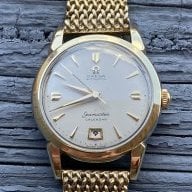
Speedmaster 1861 running fast, would you send it in?

Posts
130
Likes
35
Good day fellow watch nerds!

My Speedmaster 1861, a few months old, is gaining about a minute and a half per day.

I thought it could be magnetized, so I passed it by a compass to check, but that didn't affect the compass at all.

So I am thinking it is not magnetized.

I called the AD that I bought it from, and they said that I could bring it in, and they would send it to a service center, and it would be weeks until I saw it again.

I have also considered opening it up and trying to regulate it myself. I once regulated a Seiko watch to within COSC, but the seiko was sub $500 hahaha

What would you do in my case?

I will also add, the Speedy isn't my daily.

 
Posts
102
Likes
210
You will void the warranty if you try to service the watch yourself. That is, assuming the warranty has not expired. I have an 1861 too and they tend to get magnetized unbeknownst to the user. Let Omega deal with it.
 
Posts
52
Likes
39
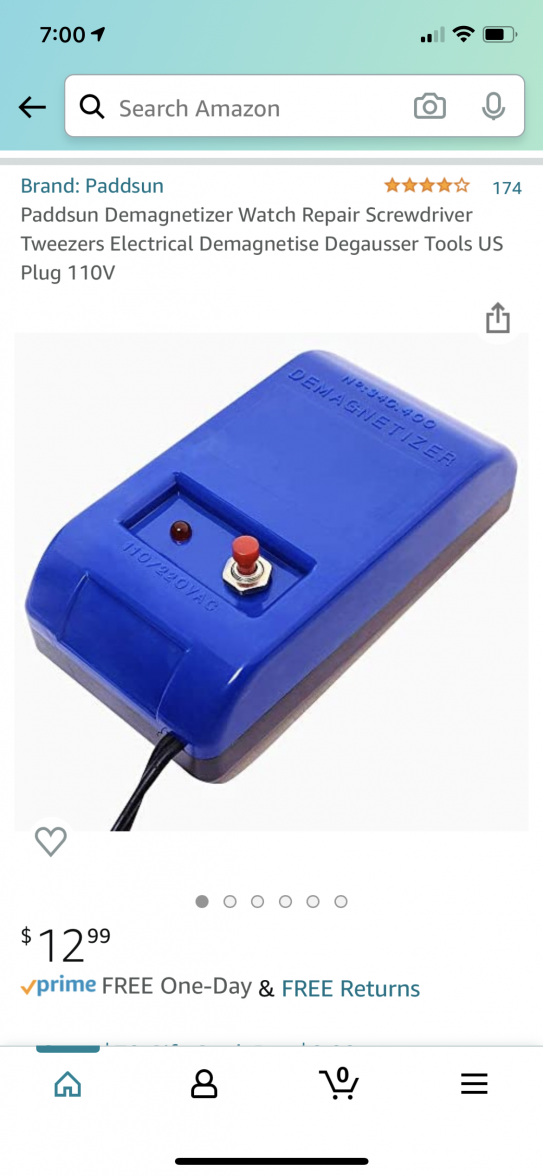
Sounds like it could be magnetized. Might try those cheapo blue demagnetizer you get on Amazon first. Shouldn’t hurt.
12$ get it tomorrow.
 
Posts
252
Likes
509
Please do not open it yourself, you will void the warranty !

Just have it sent in under warranty and get Omega to fix it.
 
Posts
895
Likes
905
I love to open stuff up and tinker but there's no way I would do that to a watch under warranty. As noted above, I would recommend demagnetizing the watch regardless of what your compass test showed. It could save you weeks without your watch. You could also take it to a watchmaker to be demagnetized if you don't want to do that yourself.

If it's not magnetized I would send it to Omega.
 
Posts
130
Likes
35
You will void the warranty if you try to service the watch yourself. That is, assuming the warranty has not expired. I have an 1861 too and they tend to get magnetized unbeknownst to the user. Let Omega deal with it.
Thanks for the reply, the watch is still under warranty 😁
 
Posts
130
Likes
35
Sounds like it could be magnetized. Might try those cheapo blue demagnetizer you get on Amazon first. Shouldn’t hurt.
12$ get it tomorrow.
Thanks for the idea. I really don't think it's magnetized, because as I said, it had no effect on the compass on my iPhone. But I'll order that. Screw it. $12 and it might fix it without any other hassles.
 
Posts
130
Likes
35
Please do not open it yourself, you will void the warranty !

Just have it sent in under warranty and get Omega to fix it.
I'm also scared of ruining the water resistance if I open it and don't seal it correctly.
 
Posts
130
Likes
35
I love to open stuff up and tinker but there's no way I would do that to a watch under warranty. As noted above, I would recommend demagnetizing the watch regardless of what your compass test showed. It could save you weeks without your watch. You could also take it to a watchmaker to be demagnetized if you don't want to do that yourself.

If it's not magnetized I would send it to Omega.
Thanks!
 
Posts
126
Likes
52
Hey Owl,

Just for clarification you used the compass on your iPhone to determine if the watch was magnetized?

I really don’t think your iPhone is a great tool to determine if your watch is magnetized.

A magnetometer is built-in since the iPhone 3GS generation, which is used to measure the strength and/or direction of the magnetic field in the vicinity of the device. Sometimes certain devices or radio signals can interfere with the magnetometer requiring users to either move away from the interference or re-calibrate by moving the device in a figure 8 motion. Since the iPhone 3GS, the iPhone also features a Compass app which was unique at time of release, showing a compass that points in the direction of the magnetic field.


Important: The accuracy of the compass can be affected by magnetic or environmental interference; even the magnets in the iPhone earbuds can cause a deviation. Use the digital compass only for basic navigation assistance. Don’t rely on it to determine precise location, proximity, distance, or direction.
 
Posts
252
Likes
509
I'm also scared of ruining the water resistance if I open it and don't seal it correctly.
This is a very real concern too.

Hey Owl,

Just for clarification you used the compass on your iPhone to determine if the watch was magnetized?

I really don’t think your iPhone is a great tool to determine if your watch is magnetized.

A magnetometer is built-in since the iPhone 3GS generation, which is used to measure the strength and/or direction of the magnetic field in the vicinity of the device. Sometimes certain devices or radio signals can interfere with the magnetometer requiring users to either move away from the interference or re-calibrate by moving the device in a figure 8 motion. Since the iPhone 3GS, the iPhone also features a Compass app which was unique at time of release, showing a compass that points in the direction of the magnetic field.


Important: The accuracy of the compass can be affected by magnetic or environmental interference; even the magnets in the iPhone earbuds can cause a deviation. Use the digital compass only for basic navigation assistance. Don’t rely on it to determine precise location, proximity, distance, or direction.

As CaliberKingPin points out, try measuring with an analog compass if you've got one laying around, they are still the best way to determine magnetism.
 
Posts
5,636
Likes
5,800
My watchmaker uses a teeny-tiny little compass with a nearly-massless indicator. Your average hand-held compass won't likely show you anything.

But as @Archer has pointed out, you can demagnetize it as often as you want, and if it runs differently, then it was probably magnetized.
 
Posts
130
Likes
35
Hey Owl,

Just for clarification you used the compass on your iPhone to determine if the watch was magnetized?

I really don’t think your iPhone is a great tool to determine if your watch is magnetized.

A magnetometer is built-in since the iPhone 3GS generation, which is used to measure the strength and/or direction of the magnetic field in the vicinity of the device. Sometimes certain devices or radio signals can interfere with the magnetometer requiring users to either move away from the interference or re-calibrate by moving the device in a figure 8 motion. Since the iPhone 3GS, the iPhone also features a Compass app which was unique at time of release, showing a compass that points in the direction of the magnetic field.


Important: The accuracy of the compass can be affected by magnetic or environmental interference; even the magnets in the iPhone earbuds can cause a deviation. Use the digital compass only for basic navigation assistance. Don’t rely on it to determine precise location, proximity, distance, or direction.
Hi CaliberKingPin!

Thanks for sharing that. Indeed what I used was the compass app on my iPhone.
 
Posts
130
Likes
35
My watchmaker uses a teeny-tiny little compass with a nearly-massless indicator. Your average hand-held compass won't likely show you anything.

But as @Archer has pointed out, you can demagnetize it as often as you want, and if it runs differently, then it was probably magnetized.
I don't have a hand held compass, but I'll pick one up soon.

Instead of ordering a demagnetizer, I decided to stop by a local watch maker. He said it will cost $10 to demagnetize it.

He's a friend so I am hoping we can put it on the time grapher as well to see what's up.

Thanks guys!
 
Posts
130
Likes
35
Hello everyone!

I am back 👍

Took it in to the watchmaker.

He immediately put it on the time grapher, and he said my beat error was too bad, the amplitude wasn't were it was supposed to be, and yes, the watch was gaining about a minute a day.

He went ahead and demagnetized it, then put it back on the timegrapher

He now said that the watch looked better on the beat error and amplitude, and it is losing a few seconds a day.

That was just in one position though.

I'm going to wear it daily for a few days and see what happens.

Thanks for the advice everyone!
 
Posts
130
Likes
35
I do wonder where my watch was magnetized though.

I never lay it on top of my cell phone or do anything obviously wrong like that.

So I am not sure.
 
Posts
5,636
Likes
5,800
Just getting near the ridiculously strong magnets in iDevices can do it. There are lots more magnets around than you might think!