Saving images off this site

Posts
1,418
Likes
2,979
Dear all,

As many of you may already do, I have for years saved images off this site on my device, for reference to specific models I own, they make up part of my own personal records and help prove authenticity.

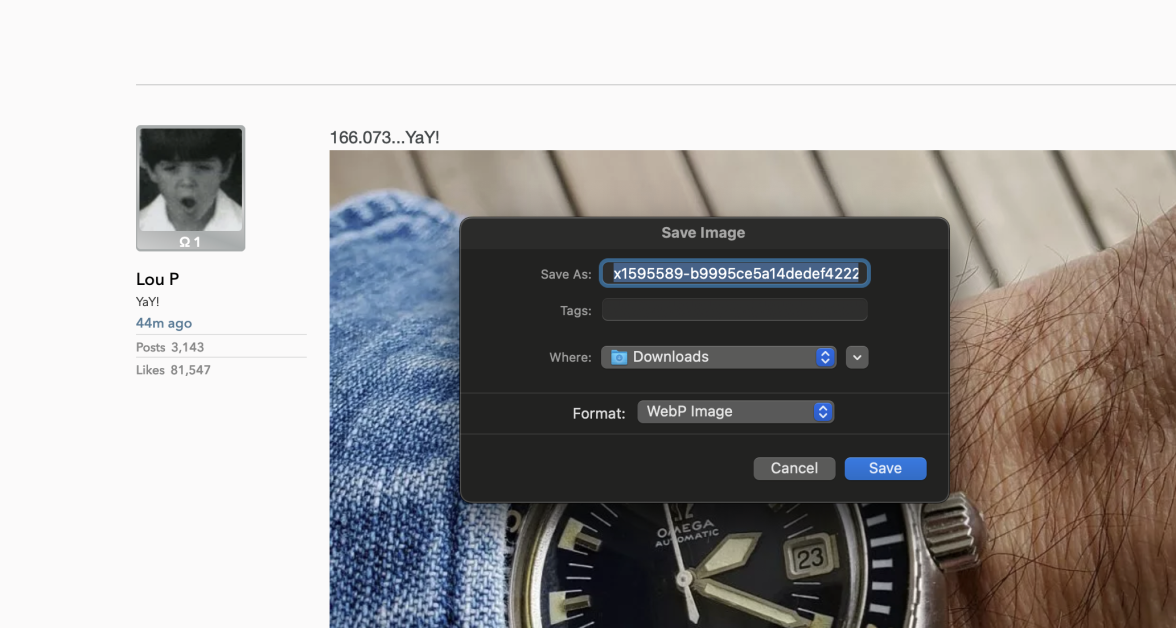
Now, lately I've been trying to save images on this site and it keeps saving them as .webp or something, I try changing to .jpg and then they're unreadable. I have no idea what I should do, is anyone else having this problem? Surely I am not the only one lol.

I've resorted to screenshotting - but this means they're not full resolution, I have to crop them down and also, then have to navigate my files to file them correctly as they land on my desktop. But hope there is a better solution?

Best wishes,

Oliver

 
Posts
6,593
Likes
26,640
Hey Oliver, if you are saving the image from the post itself, it saves as a .webp. If you open the image into a new window, it saves as a .jpg. That is my experience on my iMac. Have you given that a try?

From the post itself


I clicked on the image and it opened larger into a new window
 
Posts
13,477
Likes
31,751
Hey Oliver, if you are saving the image from the post itself, it saves as a .webp. If you open the image into a new window, it saves as a .jpg. That is my experience on my iMac. Have you given that a try?

From the post itself


I clicked on the image and it opened larger into a new window

This has been working for me, Mac as well.
 
Posts
3,503
Likes
8,771
Dear all,

Now, lately I've been trying to save images on this site and it keeps saving them as .webp or something, I try changing to .jpg and then they're unreadable. I have no idea what I should do, is anyone else having this problem? Surely I am not the only one lol.

I am on Linux and have worked in computer graphics software development since 1973 so I have tools with which you are unfamiliar, but I'll stick to what is available for every modern platform. It is not enough to change the file extension from webp to jpg, the file needs to loaded into a proper graphics editor and then saved from there into the jpg format. The editor I use for this sort of thing is GIMP, the GNU Image Manipulation Program. It's free, works on most platforms you will come across, and will do more than you, or I nowadays, will ever need. In this case you do not need the complicated stuff, open the .webp picture, select "File > export as" and change the file extension for export from GIMP to .jpg -- job done. It will not overwrite or delete the original file.

The GNU project has a 40 year history of developing very advanced software that is is free to use, and to modify if that is your thing, look it up. Much of what you get from your operating system vendor will have been built with GNU software development tools although they do not like to admit it.
 
Posts
2,067
Likes
4,210
Blame chrome for this but yes, the open in new tab should open as a jpg when you save it. If not, download irfanview for easy conversion.
 
Posts
16,307
Likes
44,981
I use an iPhone- I hold and save image. Haven’t tried to send them to myself via email to see how they open on a desktop.
 
Posts
2,691
Likes
4,286
I noticed this when I went to repost a 'Things with springs image' from a thread. I was able to convert the image to a .PNG and repost it.

The other option is simply to do a screen grab. That is how most of the phone stuff is done anyway.
 
Posts
1,418
Likes
2,979
Hey Oliver, if you are saving the image from the post itself, it saves as a .webp. If you open the image into a new window, it saves as a .jpg. That is my experience on my iMac. Have you given that a try?

From the post itself


I clicked on the image and it opened larger into a new window

Hurrah! We have a work-around! Worked on my macbook - What an odd thing to suddenly need to start doing lol

Thank you for your assistance 😀
 
Posts
2,959
Likes
17,234
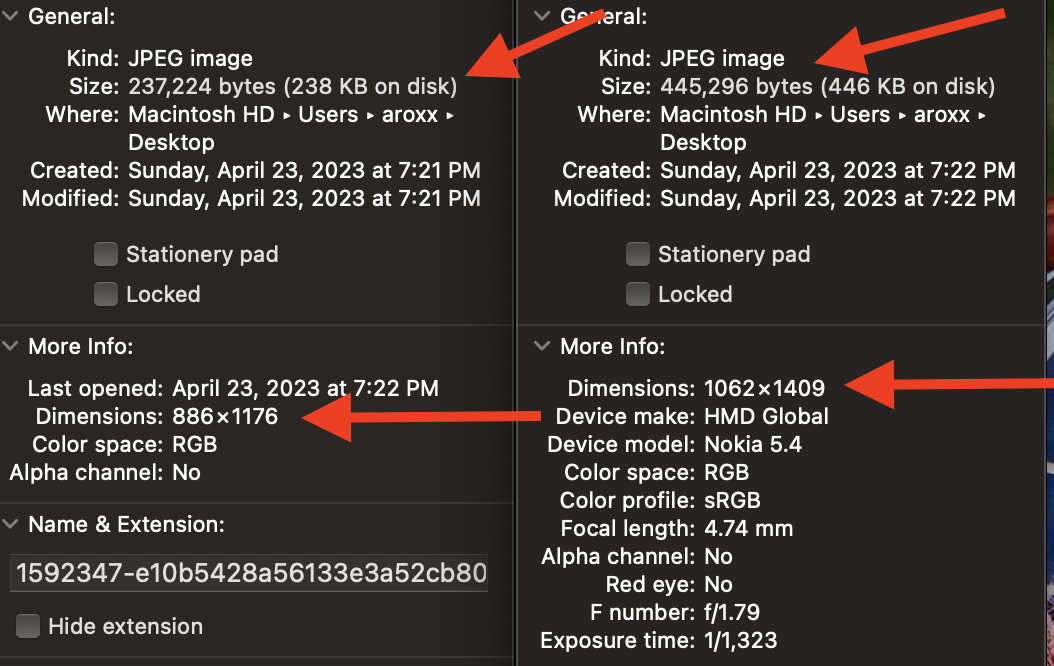
So I've always opened the full size image in a new window before saving to ensure I saved the higher resolution image. I never actually tested this until just now and it is the case. You'll notice the images you see when scrolling through a thread look compressed a bit. If you want to get a good close look you need to open it in a new window to see the full resolution image. Also, on my Macbook Pro when I right click and "Save Image As" I can still save a .jpeg either way.

This is the info for the same image grabbed off WRUW. On the left is directly from the thread and on the right is the full resolution when opened in a new window.
 
Posts
6,320
Likes
9,910
Blame chrome for this but yes, the open in new tab should open as a jpg when you save it. If not, download irfanview for easy conversion.
I use the 'save image as type' extension. That way you can save all pictures as jpg
 
Posts
4,693
Likes
17,769
I have noticed some now save a .PNG on the Iphone which is new and makes them slow to load back ( It is sometimes quicker for me to find my old images on here rather than look for them on a device)
 
Posts
2,959
Likes
17,234
I have noticed some now save a .PNG on the Iphone which is new and makes them slow to load back ( It is sometimes quicker for me to find my old images on here rather than look for them on a device)
That could also be because your iPhone is offloading old stuff to iCloud and has to download it as you go back.
 
Posts
33,463
Likes
38,167
I have noticed some now save a .PNG on the Iphone which is new and makes them slow to load back ( It is sometimes quicker for me to find my old images on here rather than look for them on a device)
That’s particularly odd as png is the format iOS uses for everything rather than jpeg even inside of apps, I’d suspect it something related to them being offloaded as suggested above or something of that nature as the file format should not cause that.
 
Posts
341
Likes
1,157
That’s particularly odd as png is the format iOS uses for everything rather than jpeg even inside of apps, I’d suspect it something related to them being offloaded as suggested above or something of that nature as the file format should not cause that.
Any interest for omegaforums to support webp formatted image files for Add Photos? Not an expert, but I think webp is promoted as smaller file size & less lossy compared to jpeg for the same image dimension.
 
Posts
33,463
Likes
38,167
Any interest for omegaforums to support webp formatted image files for Add Photos? Not an expert, but I think webp is promoted as smaller file size & less lossy compared to jpeg for the same image dimension.
The next major software update should add it I believe Trev is still working on it at the moment